
Blog – Latest
- Believing in yourself is an ever-changing process (unpacking imposter syndrome)
You feel frozen. As your big dream approaches — to show up, to really help people, to do the big thing you’ve always wanted to do — as it approaches, you begin to freeze.Who do I think I’m kidding? Why did I ever think I
- You Are Different
I cannot be you, and you cannot be me.While the differences will appear subtle at times, other times not-so-subtle.But the overall structure means you are something unlike others. An utterly different combination.A formula that worked perfectly for me might not work for you, because it was perfectly
- The Glowing Ball of I Resists Definition
Going over my notes from a month ago, I see how my thinking has evolved — but continues to clarify — about how to channel this endlessly creative mind in such a way that becomes expressible, useful, helpful. One has a deep desire to be of usefulness. One has far
Practice Building for Highly Sensitive Practitioners
The secret is to craft a program that includes all of you — and feels natural to you.
Your Vision, My Mission
In the heart of every coach, teacher, healer, consultant, and nutritionist lies a vision waiting to unfold. My mission is to help you bring that vision to life, not through one-size-fits-all solutions, but through a deeply personalized strategy that aligns with who you are, who you wish to serve, and the impact you aspire to make.
Embrace Your Unique Path
I understand the challenges solo practitioners face in a world saturated with generic advice and fleeting trends. That’s why I am dedicated to helping you carve out a path that respects your individuality, your values, and your professional aspirations. Together, we'll craft a marketing and practice growth strategy that feels authentic, resonates with your ideal clients, and amplifies your unique voice.
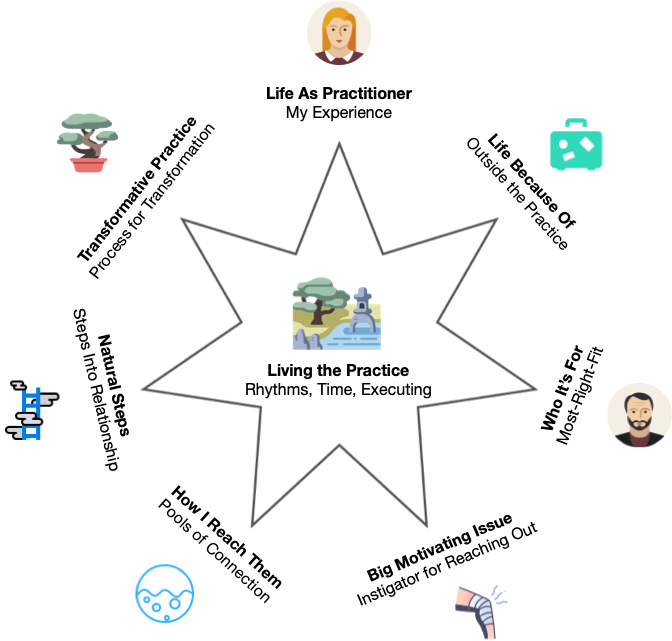
Holistic Practice Building Model
A Holistic Approach to Success
Success is not just about numbers; it's about building meaningful relationships, staying true to your values, and making a genuine difference in the lives of those you serve. My holistic approach focuses on:
- Authentic Marketing: Creating connections that are genuine and long-lasting.
- Strategic Growth: Leveraging your strengths to attract and retain your ideal clients.
- Personal Well-being: Ensuring your business growth aligns with your life’s desires and well-being.
I believe in the power of authenticity. I've seen too many talented professionals struggle to fit into molds that don't suit them. My approach is built on understanding your journey, your struggles, and your aspirations deeply. It's time to turn your passion into a thriving practice that reflects the heart of who you are.
Ready to Begin?
Discover how I can transform your practice. When you're ready, schedule a consultation to discuss how we can work together to achieve your dreams.
Let's embark on this journey together, crafting a practice that brings joy, fulfillment, and success on your terms.
Feedback
Shaka Jamal
OLU8

Kelly Milliken
Wellness Consultant
“Chris was so helpful! I got exactly what I needed.”

Jeremy Hay
Spaceship Media
“Chris rescued us when we were in a bad jam, and he did it with compassion and consummate ease.”
Akilah "Kiki" Monifa
ARISE 2.0
“Chris helped me think long term too rather than just a quick solution.”

Rachel Rosen
Spark 4 Humanity
“Working with Chris has been such a tremendous experience. To go from a vision in my head to an online platform that holds that vision and makes it real is such a gift. Thank you!”